Product · Know your members · Members and CRM
Know every family that borrows from you.
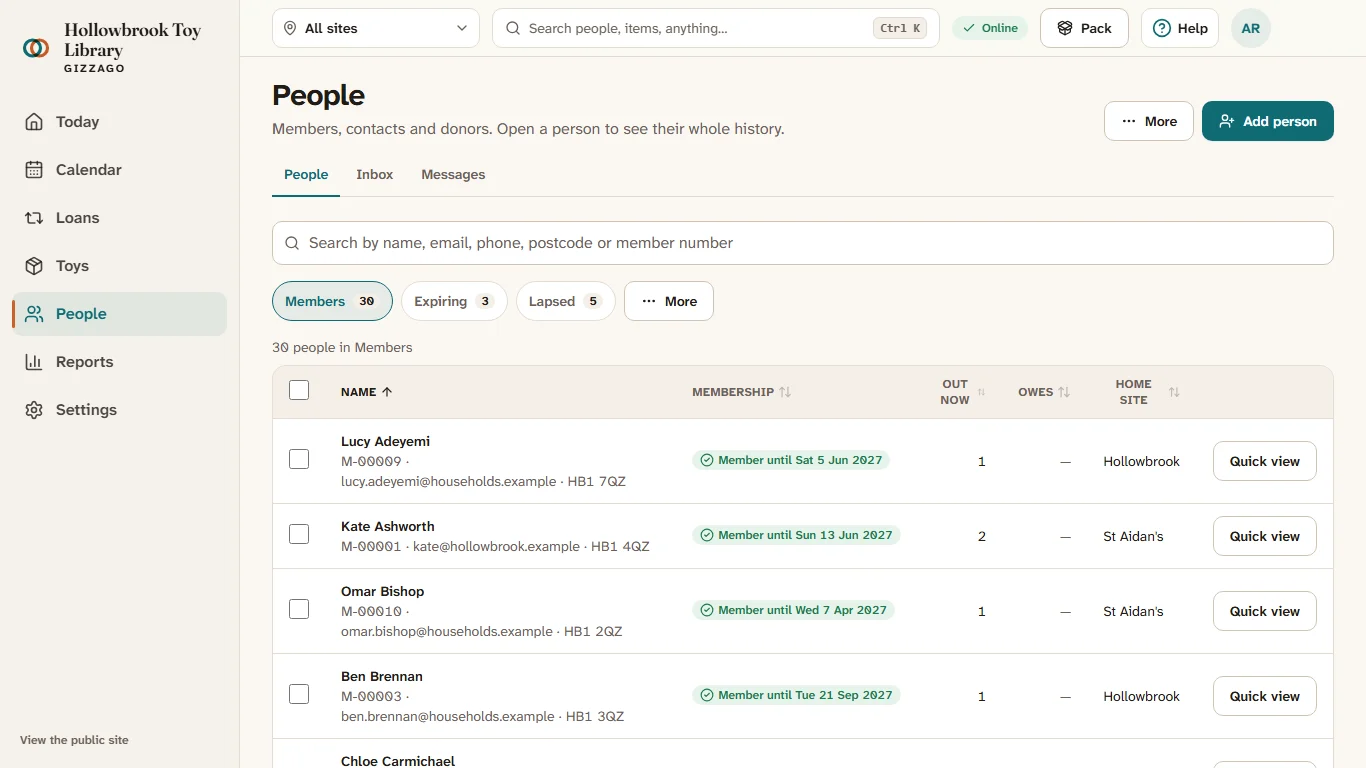
Each household in one record the whole team can see: the adults and children in it, what they have borrowed, what they owe, and every message. Ask your own joining questions, keep safeguarding notes private, and count referrals without naming families.
What it does
Members and CRM, built for how lending libraries work.
- Every plan
Households, not just names
Adults and children in one household, children recorded by month and year of birth, never a full birthday. Loans, payments, notes and desk flags in one record.
- Every plan
Your own questions
Add questions to the joining form, the desk or staff-only fields, each with a line telling families why you ask.
- Every plan
Lists that keep themselves up to date
Expiring in 30 days, lapsed, owes money, no online account. Tag people and act on a whole list at once. Duplicates are found and merged.
- Every plan
Safeguarding, done properly
Notes that only your safeguarding lead can read, proof of address recorded at a first collection, and a household can be blocked when it has to be.
- Every plan
Referrals you can count
Give health visitors and family hubs their own join link and a printed QR sheet, and waive the first fee if you choose. Reports show how many joined, never who.
- Every plan
Messages in one place
Members write from their account, the team answers from one inbox, and email replies land back in the same conversation.
Plans and prices are on the pricing page.
One set of records
Connects to the rest of your library.
From the help library
See exactly how it works.
The help library explains each part of Gizzago in plain words, using the same names as the buttons. Read it before you decide.
Try it on your own library.
30 days free on any paid plan, with no card to start. Bring your records across from a spreadsheet or your current system, preview every row first, and undo for seven days if it is not right.