Capture
Photograph a toy. The details come back.
Donations arrive in bin bags. Capture turns a phone photo and a sentence into a catalogue entry that a volunteer only has to check, not type.
How it works
- Step 1
Photograph it
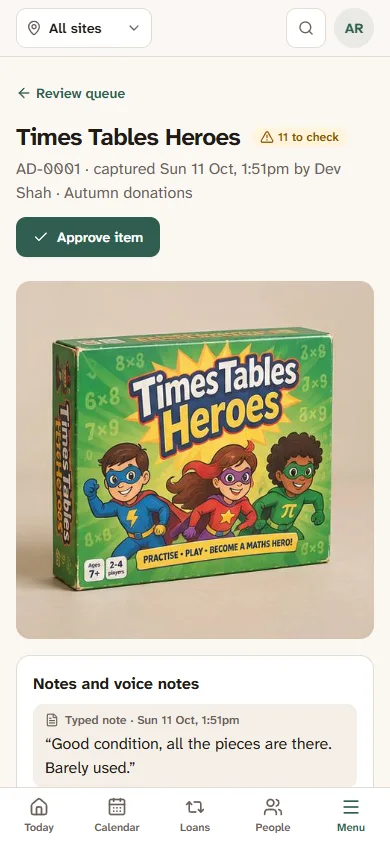
On a phone, take a photo or three: the toy, the box, the label underneath. Say a sentence about it or type a note: “all the pieces are there, barely used”.
- Step 2
The details come back
Capture reads the box and the photo and fills in the name, category, age, contents and condition. Each value says where it came from: the photo, the printed box, or your note.
- Step 3
Review
Go through what it found. Approve a value, correct it, or leave it blank. A correction is kept with the original source, so you can always see why.
- Step 4
Done
Approved toys go to the intake inbox, ready to become catalogue entries with their photos. Nothing is published until a person says so.
Where it lives
Inside Gizzago today. On its own, soon.
In Gizzago, Capture is under Toys › Add toys › Capture, for catalogue volunteers and coordinators. It works in the phone’s browser: no app to install.
A standalone Capture app, for charity shops, archives and anyone cataloguing physical things, is on its way. Its packages are a documented format, so a catalogue made in one can be read by the other.
- Several photos per item, and a voice or typed note.
- Confidence and sources for every value, never a black box.
- Machine guesses never overwrite what a person has confirmed.
- Location data is stripped from photos when they are uploaded.
- Export a batch as a .capture.zip package, with a spreadsheet of the records and the original photos inside.

Why it matters
Toys on the shelf, not in a bag in the cupboard.
The slowest part of running a library is getting new things into the catalogue. Capture started as a prototype built for exactly this job, because a library with good photos and honest descriptions lends more.
We are opening Gizzago to a few libraries at a time.
Tell us about your library and we will be in touch about joining early and moving your catalogue across.